SASEUL (SL) Mining Setup on an NVIDIA GPU, Steps and the Common CUDA Snag
How do you start mining SASEUL?
Make an address, get three programs, check, then start
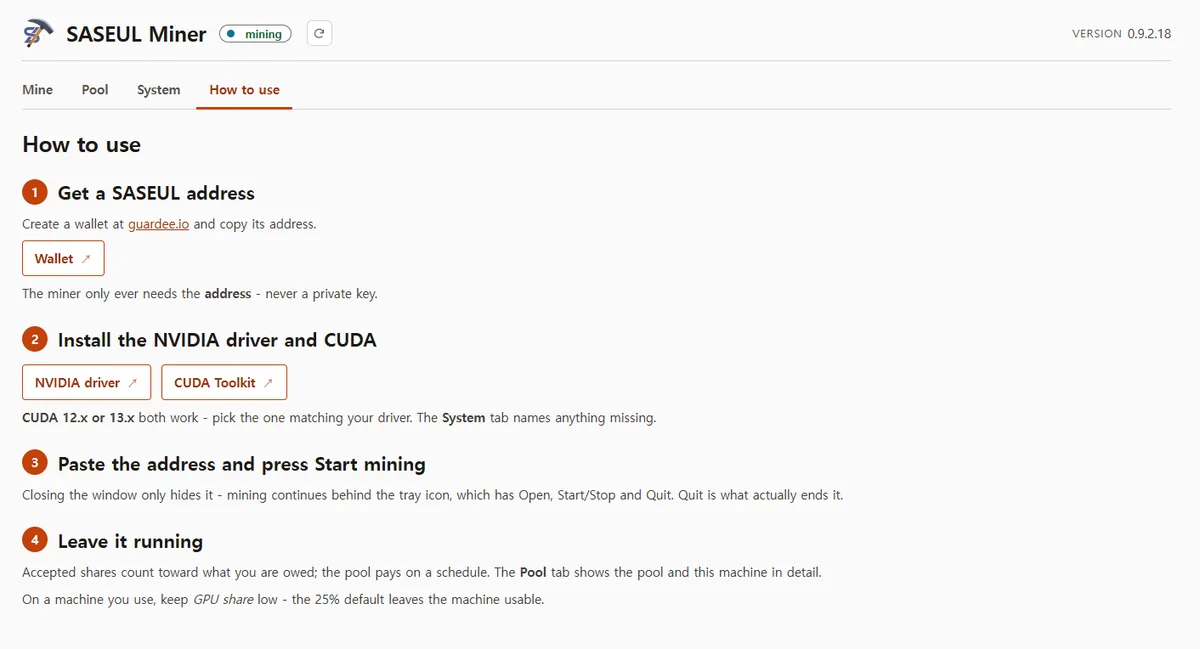
0 Address
In Guardee, recovery phrase on paper
1–2 Driver, CUDA
GTX 10 series: CUDA 12 only
3–4 Mining program
Download, unzip, check the System tab
5–6 Start
Enter address, Start mining, 25% at first
A Windows computer with an NVIDIA graphics card is all you need to start. Make an address, install two programs for the card, put the address into the mining program and click Start mining.
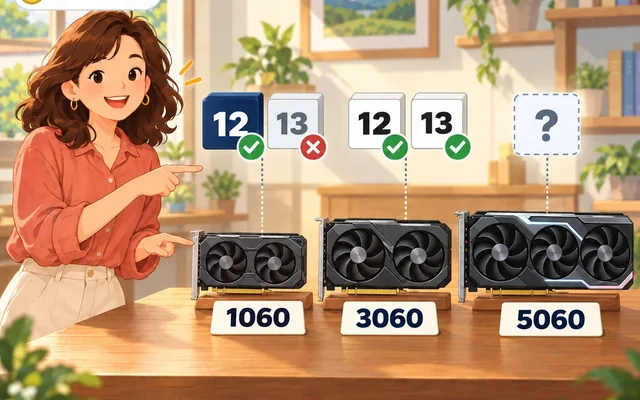
The step where most people get stuck is picking the CUDA (an NVIDIA program that lets the graphics card do calculating jobs) version. The GTX 10 series only works with version 12. Install version 13 and the mining program can't find the card.
If you get stuck on a step, go to the step with the same number in the mining guide. The guide has the full details and what to try in order.
What do you need?
- An NVIDIA graphics card (people say cards like the GTX 1060, 1660 Ti, RTX 2060 and 3050 can mine it)
- A Windows computer (Linux works too)
- A wallet address (like an account number for receiving coins)
AMD cards won't work. The mining program uses CUDA, so it's for NVIDIA cards only.
Each card generation needs a different CUDA version. Remember this table and you'll get through most of it.
| Graphics card | CUDA version to install | Where to get it |
|---|---|---|
| GTX 10 series (1060, 1070, 1080) | 12 only | CUDA Toolkit Archive |
| GTX 16 series, RTX 20, 30 and 40 series | 12 or 13 | Main download page |
| RTX 50 series | 12.8 or higher | Main download page |
The 12.8-or-higher rule for the RTX 50 series comes from NVIDIA's notes. Whether this mining program runs on RTX 50 series cards couldn't be confirmed.
How do I know if my card is NVIDIA?
You can check without the black window. Press Ctrl, Shift and Esc together and Task Manager opens.
Click the Performance tab. If a GPU box on the lower left says NVIDIA, you're set. If it opens small, click "More details" at the bottom first.
It only mines while the computer is on. If the computer goes to sleep, mining stops. There's no record of running it on a laptop, so how laptops do is unknown.
0. How do you make an address to receive coins?
Open the Guardee wallet app, or guardee.io in a computer browser, and click the start button to make a wallet.

Write the recovery phrase (a set of English words that brings a wallet back) it shows you on paper and keep it at home. Don't leave it in a photo or a chat message. If you lose your phone, you bring the wallet back with these words. Not even the developer can bring it back for you.
The recovery phrase of a new Guardee wallet works with Guardee only. You can't bring the wallet back by typing it into another wallet app (official SASEUL notice, June 19, 2026).
The address is safe for others to know. An easy way is to copy the address on your phone, send it to yourself (by email, or in Korea with KakaoTalk's "Chat with myself"), then open it on the computer and copy it.
Stuck? → Guide step 0
1. How do you install the driver?
The driver is the basic program that makes the graphics card work. Download the one for your card from NVIDIA's website, install it, and restart the computer. If you already have one, update it to the latest.
Stuck? → Guide step 1
2. Which CUDA version should you install?
Install the version that fits your card's generation, as in the table above. It doesn't come with the mining program, so you install it separately.
There's one rule to follow. The CUDA version you install must not be higher than the version your driver can handle. The simplest way is to update the driver to the latest first, then install CUDA.
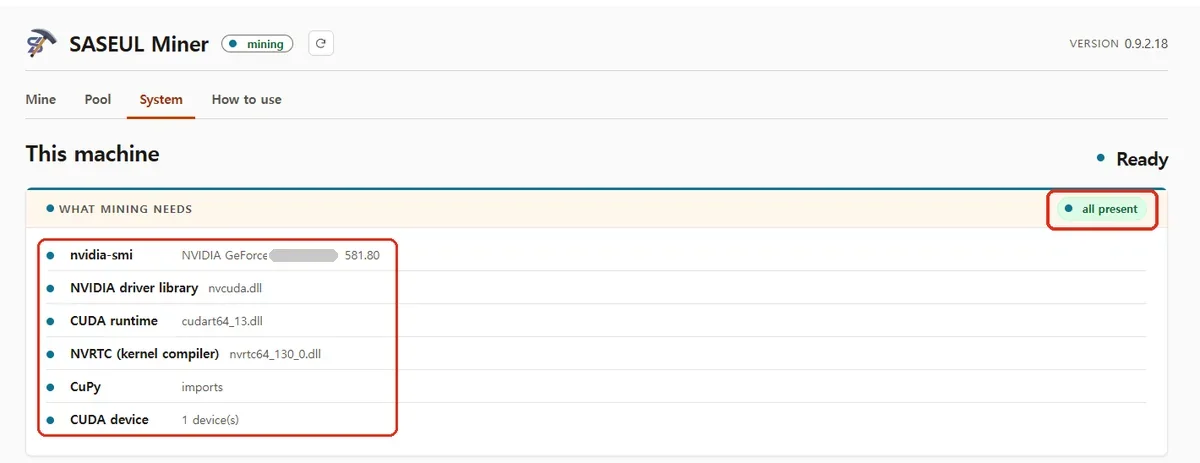
Once everything is installed, the driver number installed last is what counts. You check it on the System tab in step 4.
Stuck? → Guide step 2. The number rule is in How high does the driver number need to be?, and causes for each error message are in the CUDA error post
Seeing which version your driver can handle in the black window (Command Prompt)
Click the Start button, type cmd and press Enter. When the black window opens, type this.
nvidia-smi
The CUDA Version on the right of the top line is the highest version this driver can run. The version you install has to be the same as or lower than this number.
3. Where do you get the mining program?
Download the Windows window version (Windowed), 140 MB, from the download page on saseulmine.com. You use it by clicking with the mouse, so it's easy to mine while using the computer as usual.
Once it's downloaded, check that the file is the real one. The site lists a file fingerprint (a value that checks a file is the real one, SHA-256) for each file. If your file's fingerprint matches the value on the site, it's the real one.
Unzip it into a folder with an English name, like C:\saseul. There's no installer, so nothing outside the folder is touched.
Stuck? → Guide step 3
The command-line version, Linux, and checking the file fingerprint
The download page has three versions.
- Windows window version (Windowed), 140 MB
- Windows command-line version, 123 MB
- Linux command-line version, 162 MB
The command-line version is used by typing text into a black window. On Linux, after unzipping, you have to run chmod +x miner once before it will start.
On Windows, you see the file fingerprint like this in Command Prompt. Put the name of the file you downloaded where it says "filename".
certutil -hashfile filename SHA256
On Linux it's sha256sum filename. If the result matches the value on the site, the file is real.
4. How do you know everything is ready?
Open the mining program and look at the System tab. It shows, line by line, whether everything it needs is there. If something is missing, it even shows the link to download it.
Stuck? → Guide step 4
5. How do you start mining?
Open miner.exe in the folder you unzipped. Paste your wallet address and click Start mining. That's it.
Even if you close the window, it keeps running from the group of small icons (the tray). Click the ^ shape next to the clock at the bottom right of the screen to see the hidden small icons. To turn it off completely, click Stop mining in the window, or click Quit on that icon.
Stuck? → Guide step 5
Checking and starting with the command-line version
To check that everything is ready, type miner check. It runs the same check as the System tab in the window version.
To start, type this.
miner start YOUR_WALLET_ADDRESS
Then it runs quietly in the background. miner status shows how it's doing, and miner stop stops it. The address is saved after the first time, so from then on just type miner start.
6. How much of the graphics card should it use?
At first, leave the default of 25% as it is. It doesn't run the card at a quarter of its strength. It runs, then rests, over and over, so the card is busy about one moment in four. With that many rests, you can keep using the computer normally with mining on.
Change it with the bar on the Mine tab of the window version. The bar is locked while it's mining, so stop mining first, then change it. On a computer that only mines, you can raise it to 100%. The fan may get louder, so it's best to live with the default for a few days before raising it.
Stuck? → Guide step 6
Changing how much of the card it uses in the black window (advanced settings)
To run at 100% in the command-line version, type this.
miner start YOUR_WALLET_ADDRESS --gpu-percent 100
This setting only applies to this run. To keep it, change it to "gpu_percent": 100 in the config.json file that appears next to the mining program. Changes there take effect right away, even while mining, with no restart.
--max-stall-ms sets how long it holds the card at a time. Lower makes the computer easier to use, higher mines faster. This value is the second bar on the Mine tab of the window version.
Where do you see what's come in after you start?
Search your address on explorer.saseul.com, SASEUL's official block explorer (a site where anyone can look at the record book), and it shows what has come in. Every coin handed out is recorded in the record book.
You can also enter your address on the mining pool (a group that mines together and splits the coins) page. Still, checking on the explorer is better. The pool screen is made by the pool. The explorer shows what's written into the record book.
How much does the pool take?
The split listed on the pool site is 80% to the miner, 10% to the person who referred them, and 10% to the pool operator. Mine 100 coins and 80 are the miner's. The site says the miner's 80% stays the same even without a referrer.
Where that 10% goes when there's no referrer isn't stated on the site, so it's unknown. If you haven't reached the minimum amount for one payment, it carries over to the next time coins are handed out.
How big is this pool?
It's small. The very top of the site says "UNOFFICIAL COMMUNITY POOL." That means it isn't an official SASEUL pool.
From September 22 to 27, 2026, it found a new page of the record book every 8 hours or so on average. So coins don't come in like clockwork every day.
The pool's size and how often coins come in are in the pool post, and node counts are in the 20,000 nodes post.
Are there costs besides electricity?
Yes. Running 24 hours a day wears out the fan and the material that moves heat from the chip to the heat sink (thermal paste). The graphics card's resale value drops too, so allow for costs that don't show up in the electricity bill.
How much electricity a month of mining uses and how many coins come in a day are in the one-month mining record on an older graphics card. What kind of coin SASEUL is, is covered in SASEUL basic facts.
If you get stuck somewhere, paste the error message exactly as it is into the tip form.
Sources
- SASEUL Miner downloads and SHA-256 values, six setup steps, saseulmine.com · checked 2026-09-27
- SASEUL Mining Pool front page ("UNOFFICIAL COMMUNITY POOL" label), saseulmine.com · checked 2026-09-27 09:45 KST
- Times of blocks the pool found: official SASEUL explorer, resource block #2,317,308 (2026-09-22 19:18 KST) to #2,323,590 (2026-09-27 02:12 KST), 14 blocks left in the record book under this pool's address, 13 gaps in about 103 hours → about 7.9 hours on average · checked 2026-09-27, recounted with the official node 2026-10-01
- Official SASEUL Telegram notice (Guardee revamp, new wallets use a Guardee-only recovery phrase) · notice dated 2026-06-19, checked 2026-09-27
- Guardee wallet, guardee.io · checked 2026-09-27
- NVIDIA CUDA release notes (Maxwell, Pascal and Volta support removed in version 13) · checked 2026-09-27
- NVIDIA CUDA 12.8 release notes (Blackwell SM_120 support added) · checked 2026-09-27
- NVIDIA CUDA Toolkit Archive (older versions) · checked 2026-09-27
- How to use tab and System tab inside SASEUL Miner · checked 2026-09-23