SASEUL Miner CUDA Errors, CUDA or NVRTC Not Found and GPU Not Detected
SASEUL mining CUDA errors
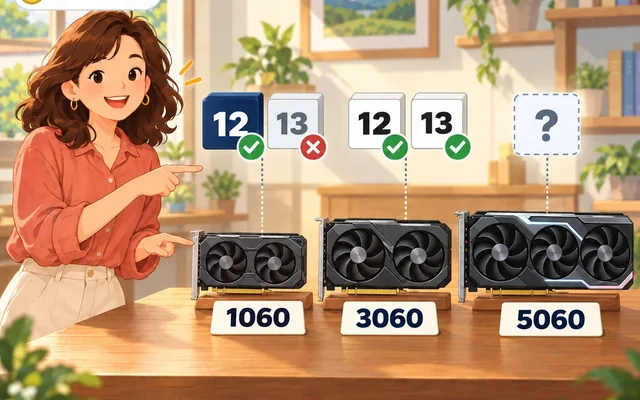
A common cause: card generation, driver and CUDA versions don't match
Graphics card
GTX 10 series: CUDA 12 only
Driver
The number installed last is what counts
CUDA
At or below what the driver can handle
Mining program
Check it on the System tab
If the miner (mining program) says CUDA is missing or can't find your card, a version mismatch is one common cause. Either the card generation and the CUDA version don't match, or the driver and the CUDA version don't match.
The driver is the basic program that makes the graphics card work. CUDA is an NVIDIA program that lets the graphics card do calculating jobs. The miner only runs when these two match each other.
This is one of the common places SASEUL (사슬코인 in Korean) mining setup trips people up. The full rules for each version are in the CUDA section of the mining guide.
What are the common causes?
Here are the symptoms matched with their usual causes. This was checked against NVIDIA's notes and the pool site's guide, opened again on September 27, 2026.
| Symptom | Usual cause and what to do |
|---|---|
| GTX 10 series card isn't found | CUDA 13 is installed. Version 13 dropped support for the 10 series (Pascal). Get version 12 from the CUDA Toolkit Archive and install it |
| It says CUDA or NVRTC is missing | CUDA isn't installed, or it came along with another program so the miner can't find it. Install CUDA properly |
| An error with the word PTX in it | The driver is older than the CUDA. Update the driver, or switch to a lower CUDA version |
| RTX 50 series card doesn't work | CUDA is below 12.8. Install 12.8 or higher. Whether the miner supports this generation couldn't be confirmed |
| Double-clicking does nothing | You downloaded the command-line version. Get the window version, or run it in the black window |
How do I see my driver version?
Open the window version of the miner and click the System tab. It shows, line by line, whether everything it needs is installed. If something is missing, it even shows the link to download it.
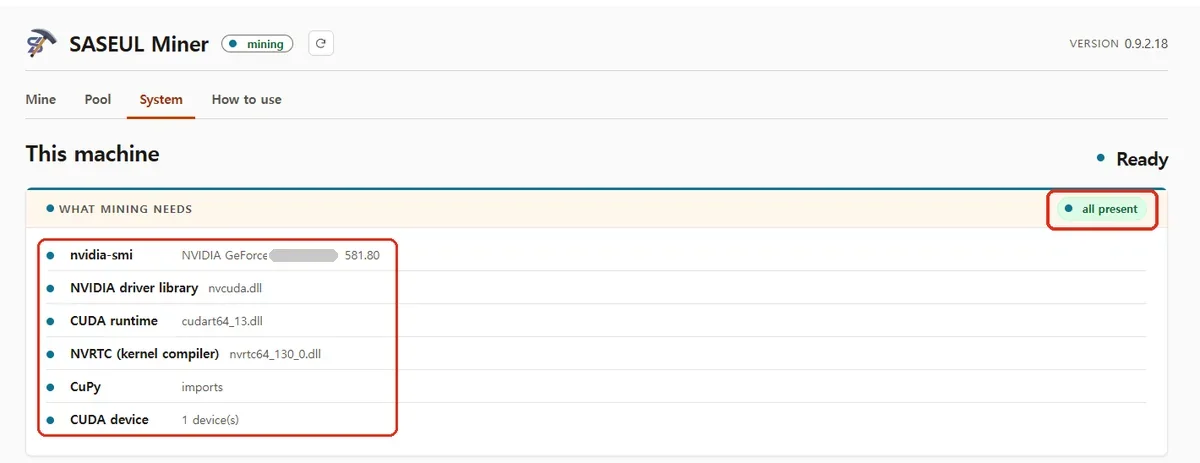
The number on the driver line is the driver version. On this screen it's 581.80.
Seeing the driver version in the black window (Command Prompt)
Command Prompt is the black window where you type text to tell the computer what to do. Click the Start button, type cmd and press Enter. When the black window opens, type this.
nvidia-smi
The top line shows Driver Version and CUDA Version. CUDA Version isn't the CUDA you have installed. It's the highest version this driver can run.
If the card name doesn't show at all, the driver isn't installed properly. In that case, reinstall the driver first, before CUDA.
What driver version do I need?
The CUDA version you install has to be the same as or lower than the CUDA Version shown in nvidia-smi. That's the safest rule.
For example, if CUDA Version shows 12.4, install 12.4 or lower. If you want 12.9, update the driver first.
These are the minimums in NVIDIA's CUDA release notes (the notes NVIDIA publishes with each version). They're only the lowest values.
| CUDA version | Minimum Windows driver | What it means |
|---|---|---|
| 12 | 527.41 | The driver number that came with 12.0 |
| 13 | 580 | The minimum for all of version 13 |
Newer versions need a higher driver. The table in NVIDIA's 12.9 release notes says the Windows driver that comes with CUDA 12.9 is 576.02.
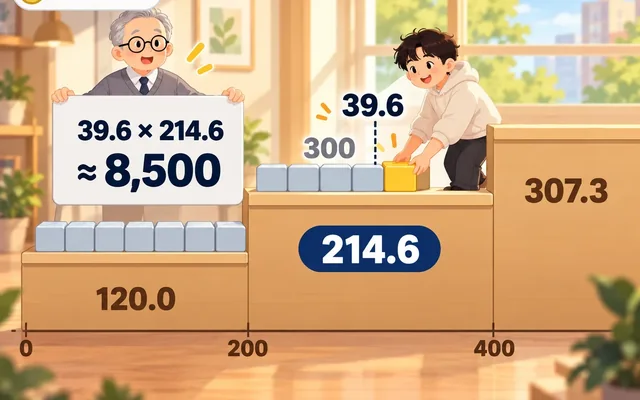
How do I make the ladder (CUDA Version) taller?
Just update the driver. You don't need to touch CUDA first.
- Install the latest NVIDIA driver
- Restart the computer when it's done
- Type
nvidia-smiin the black window and see whether CUDA Version went up - Once it shows the same or higher than the version you want (for example 12.9), then install CUDA
Updating the driver doesn't install CUDA by itself. Only the ladder got taller. You still install the box (CUDA) separately.
Older cards are getting fewer new drivers. NVIDIA says that Maxwell, Pascal and Volta cards (the GTX 10 series is Pascal) get only critical security updates from October 2025 through October 2028. If the latest driver won't install, install the newest driver made for that card. The GTX 10 series only uses CUDA 12 anyway, so it's enough if it shows at least the 12.x version you want.
Why isn't just clearing the minimum enough?
The miner seems to build its calculating code on the spot while it runs. That's because the System tab checks separately for NVRTC (an NVIDIA part that builds calculating code while a program runs).
NVIDIA's compatibility notes say programs that build calculating code this way don't run on older drivers. So you need to update the driver.
The error you get then is CUDA_ERROR_UNSUPPORTED_PTX_VERSION. NVIDIA describes it as "the provided PTX was compiled with an unsupported toolchain." In plain words, the code was made with a newer tool the driver doesn't know.
What if I install them in the wrong order?
What matters more than the order is the driver number installed last. The number shown on the System tab or in nvidia-smi after everything is installed is what counts.
The table in NVIDIA's 12.9 release notes shows that each CUDA installer comes with its own driver. So it's good to check the number once more after you're done. Updating the driver to the latest first and then installing CUDA is the least confusing.
Driver versions needed on Linux (computers that don't run Windows)
| CUDA version | Minimum Linux driver |
|---|---|
| 12 | 525.60.13 |
| 13 | 580 |
The "minimum driver for all of version 12" table in NVIDIA's 12.9 release notes lists Windows as 528.33. That's a little different from the 527.41 that came with 12.0. Either way the rule is the same. The CUDA Version in nvidia-smi just has to be the same as or higher than the version you want to install.
What should I do for each problem?
What if my GTX 10 series card isn't found?
Check whether you installed CUDA 13. NVIDIA's CUDA 13 release notes say support for the Maxwell, Pascal and Volta generations was dropped. The GTX 10 series (1060, 1070, 1080) is Pascal.
Remove version 13 and install version 12. You get version 12 from NVIDIA's CUDA Toolkit Archive, the list of older versions. On September 27, 2026, the newest version 12 release was 12.9.2.
What if it says "CUDA is missing" or "NVRTC is missing"?
You need to install CUDA separately. CUDA doesn't come with the miner. NVRTC is a part that comes with CUDA.
Install the version that fits your driver, then check again on the System tab. The saseulmine.com guide says the same.
What if it says CUDA is missing even after I installed it?
Often CUDA came along when you installed some other program, according to the saseulmine.com guide. Then CUDA isn't in the folder the miner looks in.
In that case, install CUDA again properly. How to see which folders the miner looked in is in the box below.
Seeing the folders the miner looked in, in the black window
Type miner check in the command-line version of the miner. It runs the same check as the System tab in the window version.
It also shows which folders it looked in and where it found things. Use that to install CUDA again properly. When you ask an AI, give it this result too.
What if my RTX 50 series card doesn't work?
Check that your CUDA version is 12.8 or higher. NVIDIA's CUDA 12.8 release notes say support for the RTX 50 series generation (Blackwell, SM_120) was added in 12.8.
But whether this miner runs on RTX 50 series cards isn't in the pool's guide, and no record of anyone running it could be found, so it's unknown. If it still fails on 12.8 or higher, asking in the pool's Telegram is the fastest way.
What if double-clicking does nothing?
The command-line version doesn't run from a double-click. You have to run it in the black window (Command Prompt).
If the window version won't open, the guide says to install Microsoft WebView2 Runtime (a Windows part used to show the window). It says it's usually already on Windows 10 and 11.
What if my antivirus deleted the miner?
First check that the file is the same one the site put up. Decide whether to restore it after that.
According to the saseulmine.com guide, antivirus programs block all mining programs.
Check that the file fingerprint (a value that checks a file is the real one, SHA-256) matches the value written on the site. If it doesn't match, don't use it. A matching SHA-256 value only means it's the same file the site uploaded. That's not a guarantee that it's safe. Why your antivirus deleted it isn't known. Whether to make it an exception is your call.
Seeing the file fingerprint in the black window
Type the line below in Command Prompt. Put the name of the file you downloaded where it says "filename".
certutil -hashfile filename SHA256
Compare the result with the value written on the site.
What if it still doesn't work?
The fastest way is to take a screenshot of the error and ask in the pool's Telegram or ask an AI. Give them your graphics card name, driver version, CUDA version and the System tab screen too.
For a short run-through of the setup order from the start, see how to set it up. What kind of coin SASEUL is, is covered in SASEUL basic facts.
Sources
- NVIDIA CUDA release notes (minimum driver for version 13, Maxwell, Pascal and Volta support removed) · checked 2026-09-27
- NVIDIA CUDA 12.9 Update 1 release notes (driver bundled with each version, minimum driver table for version 12) · checked 2026-09-27
- NVIDIA CUDA 12.8 release notes (Blackwell SM_120 support added, 12.0 GA driver 527.41) · checked 2026-09-27
- NVIDIA Minor Version Compatibility (programs that build calculating code don't run on older drivers) · checked 2026-09-27
- NVIDIA CUDA Driver API, Data types (description of CUDA_ERROR_UNSUPPORTED_PTX_VERSION) · checked 2026-09-27
- NVIDIA CUDA Toolkit Archive (older versions) · checked 2026-09-27
- NVIDIA · Support plan for Maxwell, Pascal and Volta GeForce GPUs (security updates only from October 2025) · updated 2025-07-31, checked 2026-09-28
- NVIDIA CUDA GPU list (RTX 50 series = Compute Capability 12.0) · checked 2026-09-27
- saseulmine.com setup steps and FAQ · checked 2026-09-27
- The driver 581.80 and CUDA 13 combination and the System tab screen are from SASEUL Miner's own screens