Has the SASEUL Blockchain Stopped? How to Check Block Height on the Explorer in 1 Minute
Has the SASEUL blockchain stopped?
Look at the time of the last page on the explorer and compare it with the usual gap
Open the explorer
explorer.saseul.com
Latest page time
How many minutes ago
Compare with usual
About one page a minute on average
You can tell in a minute whether it's stopped. Open the front page of the official block explorer (the official site where anyone can see the record book) and look at how many minutes ago the newest record book page was made.
Pages in SASEUL's mining-side record book have been added about once a minute on average since the start in May 2022. If the last page was a few minutes ago, that's normal. If it stays the same for much longer than that, it's time to check the notices.
How are main blocks different from resource blocks?
SASEUL has two record books. The official docs (Overview) say so. Both grow page by page, and each page is called a block.
| Name | What's written in it | When a new one appears |
|---|---|---|
| Main block (transaction record page) | Transactions, like who sent SL to whom | Only when there are transactions |
| Resource block (mining record page) | Mining results, who solved the puzzle | Every time a mining computer solves the puzzle |
A main block is like a household account book. If there's nothing to write, you leave it blank. A May 13, 2023 notice (#46) also said main blocks aren't made when there are no transactions.
Resource blocks keep piling up as long as mining is running. So to see "has the record book stopped?", look at the resource block time first.
How do I check on the explorer?
No sign-up or login needed.
- Open explorer.saseul.com.
- Scroll down and you'll see the "Latest Main Blocks" (newest transaction record pages) and "Latest Resource Blocks" (newest mining record pages) boxes.
- The #number at the top of each box is the newest block, and the time next to it is when it was made. "Interval" is the gap from the block before.
- Compare the time at the top of the Latest Resource Blocks box with the time now. Just see how many minutes ago it was.
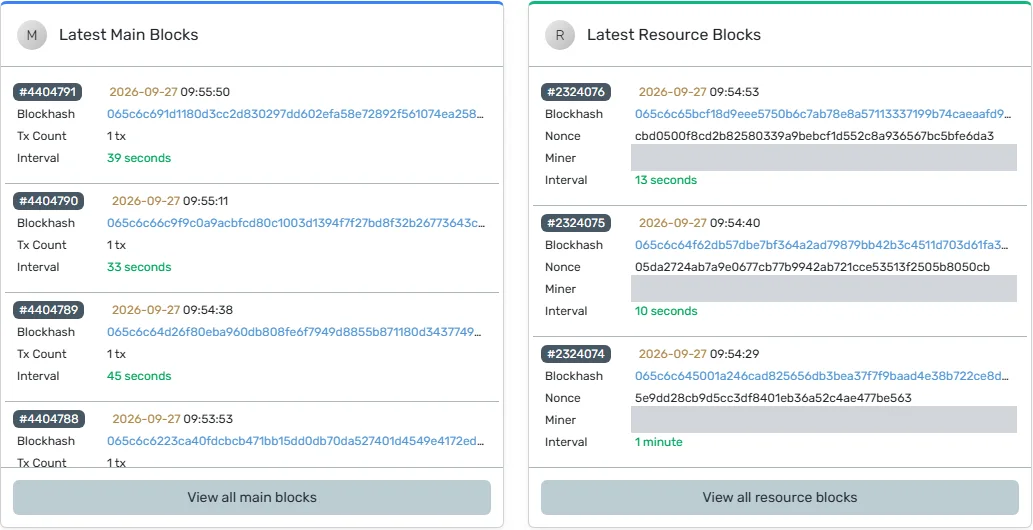
When opened from Korea, the times were shown in Korea time (checked September 27, 2026). Whether they switch to your local time when opened from another country is unknown.
You can also check with the numbers at the top. Look at the number boxes under the search box. "Main Blocks" (transaction record pages) and "Resource Blocks" (mining record pages) are how many pages have piled up so far. This number is the block height. Refresh after a minute or two and see if the Resource Blocks number went up.
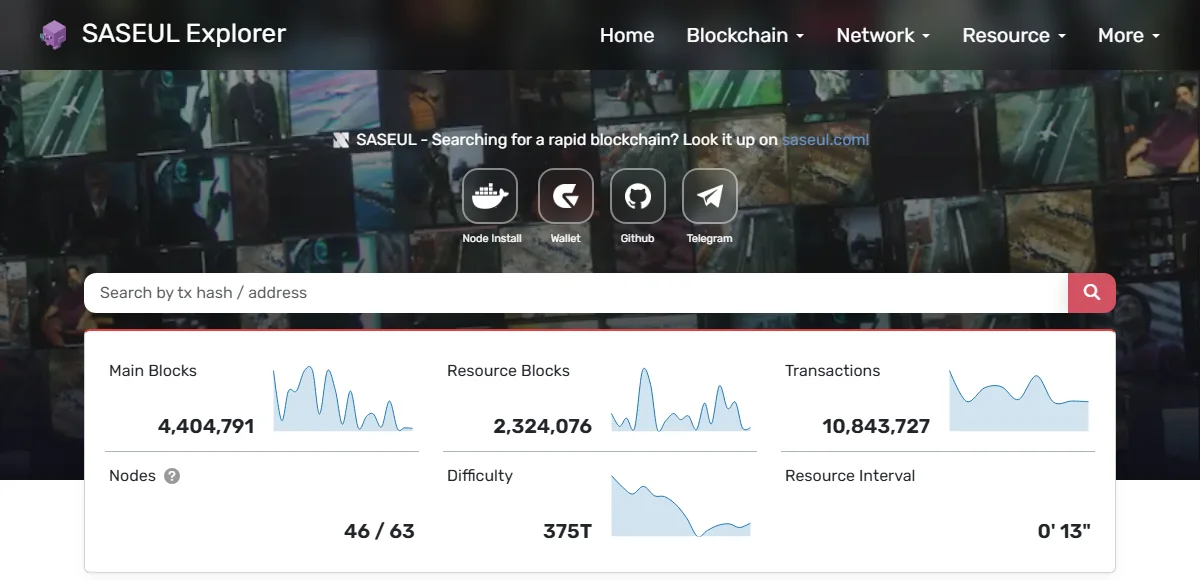
"Resource Interval" at the bottom right is how many seconds after the block before it the newest resource block came out. At 9:52 a.m. on September 27 it was 2 minutes 25 seconds, and at 9:56 it was 13 seconds. Both times, it nearly matched the time gap between the top block in the Latest Resource Blocks list and the one before it.
More detailed numbers (Statistics screen)
For more detailed numbers, click the "View all statistics" button in the "Latest Validators" box at the very bottom of the front page. That's the Statistics screen.
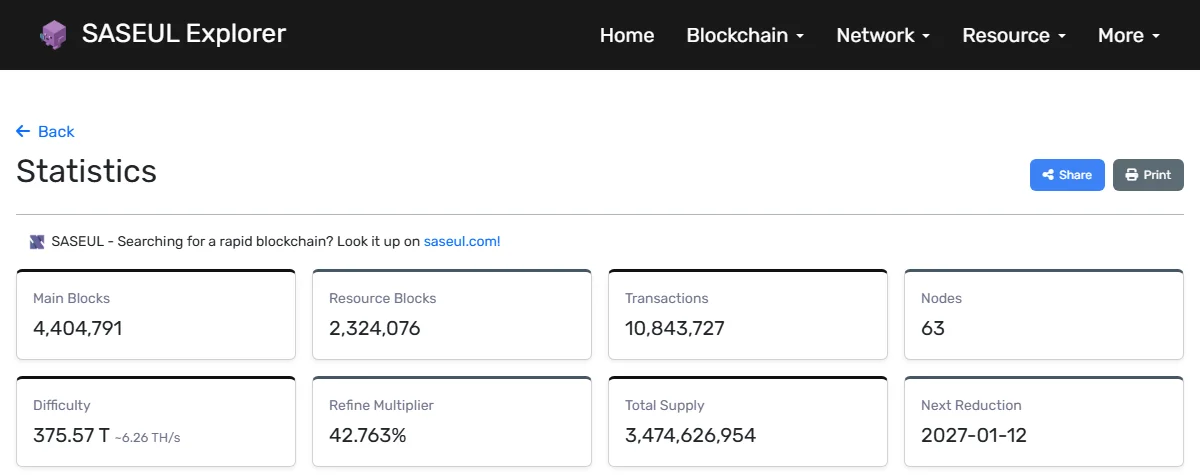
How many minutes of nothing is a problem?
There's no official rule. But you can compare with the usual gap. Here the explorer's Statistics numbers are divided by the time since SASEUL started.
| What | Usual gap | How it was worked out |
|---|---|---|
| Resource blocks | About one every 59 seconds on average (about 1,460 a day) | 2,324,047 ÷ about 1,594 days (2022-05-17 04:49 to 2026-09-27 09:23) |
| Main blocks | About one every 31 seconds on average. None when there are no transactions | 4,404,682 ÷ the same period |
| Resource blocks, morning of September 27 | 29 in 33 minutes | 2,324,047 at 9:23 → 2,324,076 at 9:56 |
Main blocks only appear when there are transactions, yet on average they came more often than resource blocks. Why they come more often, I don't know.
Even with an average of one minute, they don't come out evenly. For the 10 resource blocks between 9:44 and 9:51 a.m. on September 27, the gaps ran from as short as 5 seconds to as long as 2 minutes 30 seconds. It's like lottery wins not coming at even intervals.
So a gap of 2 or 3 minutes is common. If the number stays the same for much longer than usual, say more than 10 minutes, check the official notice channel. The 10 minutes isn't an official number, just a rough rule of thumb.
Sometimes the explorer itself won't open. On July 22, 2025, a notice (#67) said the explorer may not have been reachable because of a problem with the address lookup server (DNS). That time the problem was with the explorer, not the record book.
Has it stopped before?
Here are the breakdowns and slowdowns confirmed by notices. Dates are Korea time.
| Date | What happened | Notice |
|---|---|---|
| 2023-05-13 | The official wallet app Guardee had a problem sending transactions, since fixed (it started about 6 hours before the notice). They said it wasn't a record book problem | #46 |
| 2023-07-19 | An error in how the mining-side record book worked out difficulty (how hard the answer is to find). Fixed with a hard fork (a big update after which old programs no longer fit) | #49, #50 |
| 2023-07-20 | After the hard fork, computers on the new version had trouble finding each other. 2.1.9.3 went out in a hurry | #52 |
| 2024-09-14 | The network slowed and normal mining wasn't working well. More than half of the mining computers were using programs changed against the rules | #61 |
| 2025-07-22 | The explorer may not have been reachable because of an address lookup server problem | #67 |
| After 2026-01-15 | The record book split into two long branches about 8 times | #71 |
| 2026-06-14 | From about 7:32 p.m., some nodes (computers holding a copy of the record book) that won at mining couldn't make main blocks | #78, #79 |
Among the events known from notices, the June 14, 2026 one is the closest to "the blocks stopped". The SASEUL team said they noticed about an hour later and quickly added more mining nodes. Early the next morning (#79), they put out version 2.2.0.4 and asked miners to install it.
When this was fully fixed isn't in either notice, so that's unknown. A later notice (#82, July 28) announced version 2.2.0.5, which was fixed so a node that ends up on a different branch gets back quickly.
There's also a stop that isn't in any notice but shows up in the official explorer's records. From 6:34 a.m. on July 3, 2022, Korea time (resource block #72,762) to 7:55 a.m. on July 6 (#72,764), only two new resource blocks were added in about 73 hours. At the usual pace of about one a minute, that's time for over 4,000.
9:00 a.m. on July 6 (Korea time) was when the version 2.0.6 hard fork was set to happen (notice #6). Resource blocks started piling up again about an hour before that. Why it stopped, and whether it had anything to do with the hard fork, isn't in the notices, so that's unknown.
You can check when each block was made yourself by opening that block's detail page on the explorer.
What should I do if it looks stopped?
- Check the official SASEUL Telegram notices. You can see them on the web without logging in
- If you run your own node, check whether your node's block height matches the explorer. A July 20, 2023 notice (#52) asked people to update to the new version if the two differ
When the explorer isn't getting new numbers (a guess)
If the small "Peer Ref Time" text above the map on the explorer's front page is well behind the time now, the explorer may not be getting new numbers. This is a guess.
Commands for people running their own node
These are the node status commands from the official docs (Overview). They're for a Docker install.
sudo docker exec -it saseul-node saseul-script info
sudo docker exec -it saseul-node saseul-script log -f
info shows the node's status, and log -f keeps showing the log. What items appear on screen may differ by version.
What SASEUL is, is covered in SASEUL basic facts.
Sources
- Official SASEUL explorer front page · checked 2026-09-27 09:52, 09:56
- Official SASEUL explorer Statistics · checked 2026-09-27 09:23 (block counts, start time), 09:56 (screenshot)
- Official SASEUL explorer · resource block #72,762 details · 2022-07-03 06:34:51 (Korea time), checked 2026-09-27
- Official SASEUL explorer · resource block #72,763 details · 2022-07-03 14:10:58 (Korea time), checked 2026-09-27
- Official SASEUL explorer · resource block #72,764 details · 2022-07-06 07:55:07 (Korea time), checked 2026-09-27
- SASEUL Docs · Overview (two record books, node commands) · 2026-03-09 version, checked 2026-09-27
- Official SASEUL Telegram notice #6 · 2.0.6 and hard fork (00:00 UTC on July 6, 2022 = 9:00 a.m. Korea time) · 2022-07-06 09:58 (Korea time)
- Official SASEUL Telegram notice #46 · Guardee wallet breakdown, no main blocks without transactions · 2023-05-13
- Official SASEUL Telegram notice #49 · difficulty error · 2023-07-19
- Official SASEUL Telegram notice #50 · 2.1.9.2 and hard fork · 2023-07-19
- Official SASEUL Telegram notice #52 · 2.1.9.3 urgent fix, comparing block height · 2023-07-20
- Official SASEUL Telegram notice #61 · network slowdown · 2024-09-14
- Official SASEUL Telegram notice #67 · DNS server problem affecting explorer access · 2025-07-22
- Official SASEUL Telegram notice #71 · about 8 record book splits, update delayed · 2026-01-19
- Official SASEUL Telegram notice #78 · main block creation failure · 2026-06-15 0:50 (the failure started around 19:32 on June 14)
- Official SASEUL Telegram notice #79 · recovery work and 2.2.0.4 · 2026-06-15
- Official SASEUL Telegram notice #82 · 2.2.0.5 stability fix · 2026-07-28